Omnichannel Engagement with Salesforce, Slack, & Flow Automation
Customer expectations have changed a lot. People do not care which department handles a customer interaction; they expect the business to respond fast, consistently, and with understanding. This is where omnichannel engagement matters. Instead of keeping customer information, conversations, alerts, and workflows stuck inside separate systems, organisations can connect Salesforce, Slack, and Flow automation to create a more connected working environment.
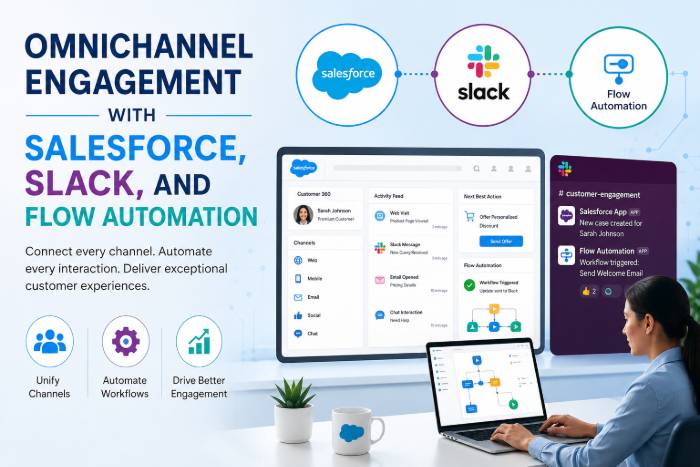
Salesforce provides the customer and business data, Slack brings that information into the conversations where teams already work, and Flow can automate the next steps. Salesforce documentation currently supports Slack actions from Flow, like sending messages and managing Slack channels, while Salesforce channels can link conversations to records such as accounts and opportunities.
Table of Contents
What Is Omnichannel Engagement?
Omnichannel engagement means creating a connected experience across different customer and business contact points. These contact points may include email, websites, social media, phone calls, customer service, sales teams, internal teamwork, and automated workflows. The goal is not just to be on many channels; it is to make those channels work together.
Imagine a customer sends a request through a website. Instead of leaving that request in a separate system, Salesforce can capture the information, Flow can check the record, and Slack can notify the right team. The employee can then work together quickly while still having access to the relevant Salesforce details. This reduces the usual problem of employees switching between apps to understand what is going on.
Why Connected Customer Experiences Matter
A disconnected customer journey causes delays and mixed-up communication. One employee may know what happened while another does not, making the customer repeat information. A connected approach helps create a shared view of customer activity and lets teams respond based on the same information.
For businesses, the real benefit is speed and consistency. When a customer record changes, the right people can be notified automatically instead of depending on someone to remember to send an update by hand.
The Role of Salesforce in Omnichannel Engagement
Salesforce can act as the main platform for customer and business information. Accounts, contacts, leads, opportunities, cases, activities, and other records provide the background needed to make customer interactions more meaningful.
The platform becomes especially powerful when automation is added. Salesforce Flow is made to automate routine tasks, guide users through steps, update records, and start actions without needing traditional programming for every process.
Salesforce as the Customer Data Hub
Consider a sales opportunity that suddenly reaches an important stage. Instead of asking a salesperson to manually tell everyone involved, a Flow can react to the Salesforce event and start the next step.
That action might include creating or updating information, sending a Slack message, or involving the right people. Salesforce documentation also explains automation that can create Slack channels for important deals and invite sales team members when certain conditions are met.
How Slack Extends Salesforce Collaboration
Salesforce stores important business information, while Slack offers a place where employees talk and work together all day. Connecting the two means important customer information does not stay hidden inside a CRM screen.
Salesforce for Slack supports access to Salesforce records, notifications, and actions directly within Slack. Salesforce also describes department-specific Slack apps, including Sales and Service offerings, that extend Salesforce workflows into Slack.
Salesforce Channels in Slack
One particularly useful capability is Salesforce channels. These Slack channels correspond to Salesforce records such as accounts and opportunities, allowing teams to centralise discussions around customer or deal activity. Slack states that Salesforce channels can synchronise conversations and updates between Slack and Salesforce when properly configured.
This changes collaboration from “goThis changes collaboration from “go check Salesforce” to “the right information is already part of the conversation.”With Action
Flow is the tool that connects business events with automatic responses. A Flow can notice a change in Salesforce and then do the right action. This could mean updating another record, creating a task, sending a notification, or talking with Slack.
Automating Notifications and Tasks
For example, suppose an opportunity passes a set revenue limit. A Flow could automatically send a Slack message to the sales leadership channel. If the business has set up Salesforce and Slack correctly, Salesforce Flow can use Slack actions to send messages to channels or direct messages.
The important idea is simple: automate routine actions so employees can focus on decisions that need human judgment.
Salesforce + Slack + Flow: How They Work Together
Think of the three technologies as three parts of the same machine:
| Technology | Primary Role |
| Salesforce | Stores customer and business data |
| Slack | Enables real-time team collaboration |
| Flow | Automates actions between events and outcomes |
The combination can create a continuous working cycle. Salesforce provides the data, Flow understands the business event and starts an action, and Slack brings the result directly to the people who need to respond.
A Typical Automated Customer Journey
Imagine a high-value customer sends a support request. Salesforce creates or updates the related case. A Flow notices that the case meets a set priority and sends a notification to the right Slack channel.
The service team can immediately discuss the issue, involve specialists, and coordinate internally. Salesforce remains the system containing the official customer record, while Slack becomes the collaboration layer. This can significantly reduce unnecessary manual communication.
Key Benefits of This Omnichannel Approach
The biggest advantage is faster collaboration. Employees do not have to continuously monitor Salesforce for every important change because automation can bring selected events to Slack.
Another advantage is consistency. Automated workflows follow predefined rules, reducing the possibility of forgotten notifications or missed follow-ups. Teams can also create more structured processes because important customer events trigger predictable responses.
Faster Response and Better Collaboration
When sales, service, marketing, and customer-success teams can collaborate around shared information, customer issues can move faster. A sales representative can involve a manager, a service employee can bring in a technical specialist, and a customer-success manager can participate in an important account discussion without creating a long chain of manual emails.
Salesforce currently provides Flow capabilities specifically designed to work with Slack, including screen flows that can be launched from Slack conversations, shortcuts, actions, or buttons.
Practical Use Cases
The possibilities are broad. Sales teams can receive alerts about major opportunities, stage changes, important account activity, or approaching deadlines. Service teams can receive notifications about high-priority cases and collaborate with specialists inside Slack. Customer-success teams can create workflows around renewals, escalations, onboarding milestones, or account health.
Marketing teams can also benefit when campaign or lead activity needs rapid internal attention. The key is not to automate every possible event. Too many notifications create another form of information overload.
Sales, Service, and Customer Success
A useful implementation starts with business events that genuinely require collaboration. For example, a major opportunity reaching a negotiation stage may deserve a Slack notification, while every minor Salesforce field change probably does not.
The objective should always be relevant automation rather than maximum automation.
Best Practices for Implementation
Start by identifying the business problems that cause delays. Ask where employees currently copy information between systems, manually send notifications, repeatedly check records, or wait for another department to respond.
Then select a small number of high-value workflows. Build and test them carefully before expanding. Salesforce recommends creating and testing Slack-enabled flows in a sandbox before deploying them to production.
Start Small and Measure Results
Track practical metrics such as response time, workflow completion time, missed follow-ups, employee adoption, and customer satisfaction. If a workflow saves time without creating notification fatigue, it is doing its job.
Security and permissions also matter. Slack Flow core actions operate in the context of the running user, so organisations should understand what users are permitted to access before deploying automation broadly.
Conclusion
Salesforce, Slack, and Flow automation can transform omnichannel engagement from a collection of disconnected tools into a connected business process. Salesforce provides customer context, Slack brings collaboration into the daily workflow, and Flow connects events with automated actions.
The real opportunity is not simply integrating three technologies. It is designing a smarter customer journey in which the right information reaches the right people at the right moment. When implemented thoughtfully, this approach can help organisations respond faster, reduce repetitive work, improve collaboration, and deliver a more consistent customer experience.
FAQs
1. What is omnichannel engagement in Salesforce?
Omnichannel engagement in Salesforce refers to connecting customer interactions, business data, communication channels, and workflows so teams can deliver a consistent and contextual experience across touchpoints.
2. How does Slack work with Salesforce?
Salesforce and Slack can be connected so employees can access relevant Salesforce information, receive notifications, collaborate around Salesforce records, and perform supported actions directly from Slack.
3. What is the role of Salesforce Flow?
Salesforce Flow automates business processes. It can respond to Salesforce events and perform actions such as updating records, creating tasks, and sending Slack messages.
4. Can Salesforce Flow send messages to Slack?
Yes. Salesforce provides a Send Slack Message Flow action that can send messages to a Slack channel or direct message when the required Salesforce-Slack integration and permissions are configured.
5. Why combine Salesforce, Slack, and Flow?
Combining them connects data, communication, and automation. Salesforce manages customer context, Slack supports real-time collaboration, and Flow automates actions that connect business events to team responses.
Read Also: How do multiple Salesforce Clouds Work Together?