How do multiple Salesforce Clouds Work Together?
Table of Contents
How do multiple Salesforce Clouds Work Together?
Salesforce is much more than a CRM platform. It is a complete ecosystem of cloud-based applications designed to manage every stage of customer interaction. From attracting leads and closing deals to providing customer support and running marketing campaigns, different Salesforce Clouds work together seamlessly to deliver a connected customer experience.
Organizations often use multiple Salesforce Clouds rather than relying on a single solution. When integrated properly, these clouds eliminate data silos, improve collaboration, and help businesses provide personalized experiences across sales, service, marketing, and commerce.
In this blog, we will explore how multiple Salesforce Clouds work together and how businesses can leverage them for better customer relationships and higher productivity.
What Are Salesforce Clouds?
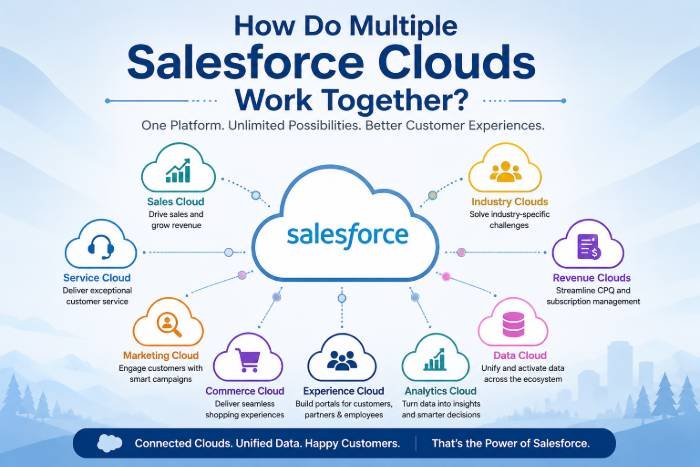
Salesforce Clouds are specialized products designed for specific business functions. Some of the major clouds include:
- Sales Cloud
- Service Cloud
- Marketing Cloud
- Commerce Cloud
- Experience Cloud
- Data Cloud
- Analytics Cloud
- Industry Clouds
- Revenue Cloud
Each cloud has unique capabilities, but they become far more powerful when connected.
Major Salesforce Clouds and Their Functions
| Salesforce Cloud | Primary Purpose | Key Users |
|---|---|---|
| Sales Cloud | Lead and opportunity management | Sales Teams |
| Service Cloud | Customer support and case management | Support Teams |
| Marketing Cloud | Campaign automation and customer journeys | Marketing Teams |
| Commerce Cloud | Online shopping experiences | E-commerce Teams |
| Experience Cloud | Customer and partner portals | Customers & Partners |
| Data Cloud | Unified customer data platform | Entire Organization |
| Analytics Cloud | Reporting and dashboards | Managers & Executives |
| Revenue Cloud | CPQ and subscription management | Sales Operations |
| Industry Clouds | Industry-specific solutions | Healthcare, Finance, Manufacturing |
Why Businesses Use Multiple Salesforce Clouds
Modern businesses need a 360-degree customer view. Customers interact through various channels such as:
- Website
- Social media
- Phone calls
- Customer support
- Online stores
Using separate tools creates disconnected information. Salesforce Cloud solves this issue by sharing customer data across departments.
Benefits include:
- Improved customer experience
- Faster response times
- Better collaboration
- Increased sales opportunities
- Personalized marketing
- Enhanced reporting and analytics
- Reduced manual work
How Salesforce Clouds Work Together
1. Sales Cloud + Marketing Cloud
Marketing teams generate leads through email campaigns and social media.
Workflow:
- Marketing Cloud captures leads.
- Lead information automatically enters Sales Cloud.
- Sales representatives follow up with prospects.
- Customer activities are tracked in one place.
- Marketing receives feedback on campaign performance.
Example
A customer downloads an eBook from a website.
- Marketing Cloud sends nurturing emails.
- The customer opens several emails.
- Lead score increases.
- Sales Cloud automatically notifies the sales team.
- The sales representative contacts the prospect.
Benefits
- Better lead nurturing
- Improved conversion rates
- Automated workflows
- Higher ROI
2. Sales Cloud + Service Cloud
Customer relationships do not end after the sale.
Integration Process
- The sales team closes a deal.
- Customer details move to Service Cloud.
- Support agents view purchase history.
- Cases and issues are tracked.
- Service teams provide faster assistance.
Example
A customer buys software.
If they face installation problems:
- Service agents instantly see product details.
- They resolve issues quickly.
- Customer satisfaction improves.
Benefits
- Complete customer visibility
- Reduced support time
- Better customer retention
- Increased upselling opportunities
3. Marketing Cloud + Service Cloud
Support interactions provide valuable customer insights.
Workflow
- Customers raise support tickets.
- Service Cloud records interactions.
- Marketing Cloud uses this information.
- Personalized campaigns are delivered.
Example
A customer reports a complaint.
After resolution:
- Marketing Cloud sends a satisfaction survey.
- Later, it offers related products.
- Communication becomes more personalized.
Benefits
- Personalized customer journeys
- Improved customer engagement
- Stronger relationships
- Increased loyalty
4. Commerce Cloud + Sales Cloud
Commerce Cloud powers online stores while Sales Cloud manages relationships.
Integration Process
- Customers place orders online.
- Purchase data syncs with Sales Cloud.
- Sales representatives gain complete customer history.
- Cross-selling opportunities increase.
Example
A customer buys a laptop online.
Sales Cloud records:
- Product purchased
- Order value
- Buying frequency
Sales representatives can later recommend:
- Accessories
- Extended warranties
- Additional services
Benefits
- Unified customer profile
- Better recommendations
- Higher revenue opportunities
5. Service Cloud + Experience Cloud
Experience Cloud enables self-service portals.
Workflow
- Customers log into portals.
- Raise support cases.
- Track case status.
- Access knowledge articles.
Service Cloud manages all interactions behind the scenes.
Benefits
- Reduced support workload
- Faster issue resolution
- Improved customer satisfaction
- Better engagement
6. Data Cloud Connects Everything
Data Cloud acts as the central intelligence layer.
It collects information from:
- Sales Cloud
- Marketing Cloud
- Service Cloud
- Commerce Cloud
- External systems
- Websites
- Mobile applications
Key Features
- Unified customer profiles
- Real-time data updates
- AI-powered insights
- Customer segmentation
- Predictive analytics
Benefits
- Single source of truth
- Better decision-making
- Personalized experiences
- Accurate reporting
Complete Customer Journey Across Multiple Clouds
| Customer Stage | Salesforce Cloud Involved | Action |
|---|---|---|
| Awareness | Marketing Cloud | Email campaigns and ads |
| Lead Generation | Marketing Cloud + Sales Cloud | Capture and nurture leads |
| Opportunity Management | Sales Cloud | Manage pipeline |
| Purchase | Commerce Cloud | Process orders |
| Onboarding | Sales Cloud + Service Cloud | Customer setup |
| Support | Service Cloud | Resolve issues |
| Self-Service | Experience Cloud | Customer portals |
| Analytics | Data Cloud + Analytics Cloud | Customer insights |
Real-World Example
Suppose an online electronics company uses multiple Salesforce Clouds.
Step 1: Marketing Cloud
- Sends promotional emails.
- Attracts potential customers.
Step 2: Sales Cloud
- Converts leads into customers.
- Tracks opportunities.
Step 3: Commerce Cloud
- Processes online orders.
Step 4: Service Cloud
- Handles customer inquiries and complaints.
Step 5: Experience Cloud
- Provides customer portal access.
Step 6: Data Cloud
- Creates a unified customer profile.
Step 7: Analytics Cloud
- Measures sales and customer trends.
This creates a smooth and connected customer journey.
Advantages of Using Multiple Salesforce Clouds
Improved Collaboration
Departments work from the same customer information.
Better Customer Experience
Customers receive consistent support across channels.
Automation
Manual tasks are minimized through workflows and AI.
Higher Revenue
Cross-selling and upselling become easier.
Faster Decision-Making
Real-time dashboards provide actionable insights.
Scalable Platform
Organizations can add new clouds as they grow.
Increased Productivity
Employees spend less time switching between systems.
Note: Join Our Salesforce Classes in Pune for Practical Learning
Best Practices for Multi-Cloud Salesforce Implementation
- Define clear business objectives.
- Integrate data across departments.
- Use Data Cloud for customer unification.
- Automate processes with Flow and AI.
- Maintain proper security and permissions.
- Train employees regularly.
- Create dashboards for monitoring performance.
- Continuously optimize customer journeys.
Conclusion
The real power of Salesforce lies in its ecosystem. Individual clouds are powerful on their own, but when Sales Cloud, Service Cloud, Marketing Cloud, Commerce Cloud, Experience Cloud, and Data Cloud work together, organizations gain a complete 360-degree view of customers.
This connected approach enables businesses to deliver personalized experiences, improve customer satisfaction, increase operational efficiency, and drive revenue growth. As companies continue embracing digital transformation, a multi-cloud Salesforce strategy becomes essential for creating seamless customer journeys and achieving long-term business success.
FAQs
1. Can multiple Salesforce Clouds share data?
Yes. Salesforce Clouds are designed to integrate and share customer data seamlessly.
2. Which cloud acts as the central data layer?
Data Cloud serves as the unified customer data platform across all Salesforce products.
3. Is it necessary to use all Salesforce Clouds?
No. Businesses can choose only the clouds they need and expand later.
4. Can Sales Cloud integrate with Marketing Cloud?
Yes. Leads generated in Marketing Cloud can automatically flow into Sales Cloud.
5. Which cloud is best for customer support?
Service Cloud is specifically designed for case management and customer service operations.
Read Also: The Future of Salesforce Trends, Innovations, and Opportunities