How Google Ads Works: A Complete Beginner’s Guide
Businesses need fast and effective ways to reach potential customers online. One of the most powerful online advertising platforms is Google Ads. Whether you own a small business, an e-commerce store, a coaching institute, or a startup, Google Ads can help you generate leads, website traffic, sales, and brand awareness quickly.
This article explains how Google Ads works, its types, benefits, bidding system, campaign process, and tips to achieve better results.
Table of Contents
What is Google Ads?
Google Ads is an online advertising platform developed by Google where advertisers pay to show their ads on Google Search, YouTube, websites, mobile apps, and more.
It works on a Pay-Per-Click (PPC) model, which means advertisers only pay when someone clicks on their ad.
For example:
- A user searches for “Digital Marketing Course in Pune.”
- Google shows relevant ads at the top of search results
- When the user clicks the ad, the advertiser pays a small amount
Google Ads helps businesses target customers exactly when they are searching for products or services.
Why Google Ads is Important for Businesses
Google receives billions of searches every day. This makes Google Ads one of the best platforms for reaching targeted audiences.
Benefits of Google Ads
- Instant website traffic
- Quick lead generation
- Increased sales and conversions
- Brand awareness
- Audience targeting
- Measurable performance
- Flexible budget options
- Better ROI compared to traditional advertising
Businesses of all sizes use Google Ads because it delivers fast and measurable results.
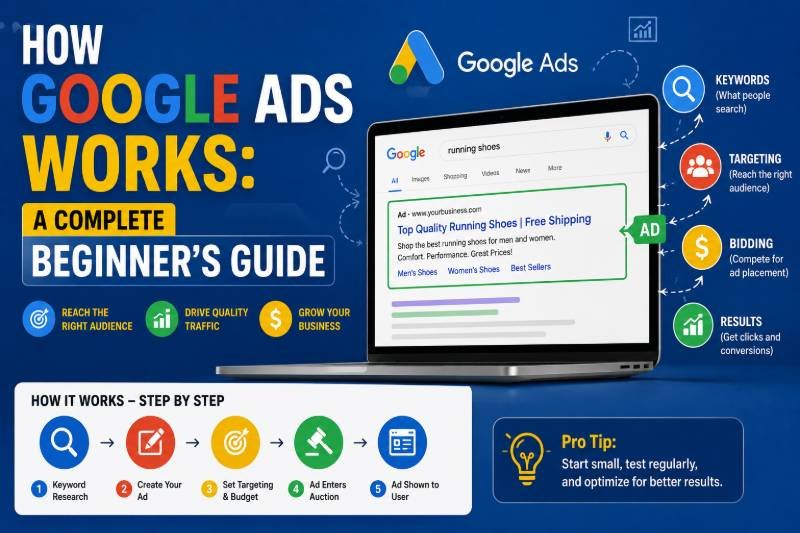
How Google Ads Works Step-by-Step
Understanding the working process of Google Ads is very important for beginners.
1. Choosing Campaign Goal
The first step is selecting a campaign objective.
Common campaign goals include:
- Website traffic
- Leads
- Sales
- App promotion
- Brand awareness
- Product purchases
- Store visits
Your campaign setup depends on your business goal.
2. Selecting Keywords
Keywords are the foundation of Google Search Ads.
Keywords are the words or phrases users type into Google.
Example keywords:
- Best digital marketing course
- Buy sports shoes online
- Real estate agent near me
- SEO services company
Google matches these keywords with user searches and displays relevant ads.
Types of Keywords Match
Broad Match
Ads appear for related searches.
Phrase Match
Ads appear when the search includes your keyword phrase.
Exact Match
Ads show only for highly specific searches.
Using the right keywords improves ad performance and lowers advertising costs.
3. Creating Ads
Advertisers create attractive ads with:
- Headlines
- Descriptions
- Website URL
- Call-to-action
Example of a Google Ad
Headline:
Best Digital Marketing Course in Pune
Description:
100% Practical Training with Placement Assistance. Join Today.
A well-written ad increases clicks and conversions.
4. Google Ad Auction Process
Whenever someone searches on Google, an instant auction happens behind the scenes.
Google decides:
- Which ads will appear
- Ad positions
- Cost per click
This process takes milliseconds.
What Determines Ad Ranking?
Google uses several factors to rank ads.
A. Bid Amount
This is the maximum amount an advertiser is willing to pay for a click.
Higher bids may improve visibility.
B. Quality Score
Quality Score is a very important factor in Google Ads.
It is based on:
- Ad relevance
- Expected click-through rate
- Landing page experience
- Keyword relevance
A higher Quality Score can reduce advertising costs.
C. Ad Rank
Google combines:
- Bid amount
- Quality Score
- Ad relevance
to determine the final ad position.
Even advertisers with lower bids can rank higher if their ads are more relevant.
Types of Google Ads Campaigns
Google Ads offers different campaign types for different business goals.
1. Search Ads
These ads appear on Google search results.
Best for:
- Lead generation
- Service businesses
- Local businesses
- High-intent customers
Example:
Someone searches “SEO agency in Pune” and sees sponsored ads.
2. Display Ads
Display ads appear on websites, blogs, and apps within Google’s Display Network.
These ads include:
- Images
- Banners
- Graphics
Best for:
- Brand awareness
- Remarketing
- Product visibility
3. YouTube Ads
These video ads appear on YouTube.
Best for:
- Video marketing
- Brand awareness
- Product demonstrations
Popular YouTube ad formats include:
- Skippable ads
- Non-skippable ads
- Shorts ads
- In-stream ads
4. Shopping Ads
Shopping ads display products with:
- Product image
- Price
- Brand name
- Reviews
Best for eCommerce businesses.
These ads usually appear at the top of Google search results.
5. App Promotion Ads
These ads help businesses increase app downloads.
Ads appear on:
- Google Play Store
- YouTube
- Search results
- Mobile apps
6. Performance Max Campaigns
Performance Max campaigns use AI and automation to run ads across all Google platforms.
These campaigns appear on:
- Search
- YouTube
- Gmail
- Display Network
- Discover
Google automatically optimizes targeting and bidding.
Understanding Bidding in Google Ads
Google Ads provides different bidding strategies.
Manual CPC
Advertisers manually set bid amounts.
Best for experienced advertisers.
Maximize Clicks
Google automatically tries to get the maximum clicks within the budget.
Maximize Conversions
Google focuses on generating more conversions.
Target CPA
CPA means Cost Per Acquisition.
Google tries to achieve conversions at a specific cost.
Target ROAS
ROAS means Return on Ad Spend.
Used mainly in eCommerce campaigns.
What is PPC in Google Ads?
PPC stands for Pay-Per-Click.
Advertisers only pay when users click the ad.
Example
- Ad receives 100 clicks
- Cost per click = ₹10
- Total cost = ₹1000
This makes Google Ads cost-effective because businesses pay for actual engagement.
Importance of Landing Pages
A landing page is the page users visit after clicking the ad.
A good landing page should include:
- Fast loading speed
- Mobile-friendly design
- Clear call-to-action
- Relevant content
- Trust signals
- Contact form
A better landing page improves conversion rates and Quality Score.
Benefits of Google Ads Over Traditional Marketing
| Traditional Marketing | Google Ads |
| Expensive | Flexible budget |
| Difficult tracking | Easy analytics |
| Broad audience | Targeted audience |
| Slow results | Fast results |
| Offline visibility | Online visibility |
Google Ads offers better targeting and more measurable performance than newspaper, banner, or TV ads.
Common Google Ads Metrics
Understanding metrics is important for campaign success.
Impressions
Number of times your ad is shown.
Clicks
Number of users who clicked your ad.
CTR (Click Through Rate)
Percentage of users clicking after seeing the ad.
CPC (Cost Per Click)
Amount paid per click.
Conversion Rate
Percentage of users completing the desired action.
CPA (Cost Per Acquisition)
The cost required to generate one customer or lead.
Tracking these metrics helps improve campaign performance.
Tips for Running Successful Google Ads Campaigns
Use High-Intent Keywords
Target keywords with buying intent.
Write Strong Ad Copy
Use attractive headlines and clear CTAs.
Optimize Landing Pages
Ensure pages are fast and relevant.
Use Negative Keywords
Prevent irrelevant traffic.
Monitor Campaigns Regularly
Analyze and optimize weekly.
Enable Conversion Tracking
Measure leads and sales accurately.
Focus on Mobile Optimization
Most users search through smartphones.
Common Mistakes to Avoid
Many beginners waste money because of poor campaign management.
Avoid These Mistakes
- Using broad keywords only
- Ignoring negative keywords
- Sending traffic to poor landing pages
- Not tracking conversions
- Writing weak ad copy
- Running ads without a strategy
- Ignoring mobile users
Proper optimization helps reduce ad spend and improve ROI.
Future of Google Ads
Google Ads is evolving rapidly with Artificial Intelligence and automation.
Future trends include:
- AI-powered bidding
- Smart audience targeting
- Voice search advertising
- Automation tools
- Video-first advertising
- Performance Max campaigns
Businesses that use modern advertising strategies will gain a competitive advantage.
Conclusion
Google Ads is one of the most effective online advertising platforms for businesses of all sizes. It helps companies reach targeted customers, generate quality leads, increase sales, and build brand awareness quickly.
By understanding keywords, bidding, Quality Score, ad targeting, and campaign optimization, businesses can achieve excellent results with Google Ads.
Whether you are a beginner, freelancer, entrepreneur, or digital marketer, learning Google Ads can open huge career and business opportunities in the digital marketing industry.
Investing time in mastering Google Ads can help businesses grow faster and stay ahead in today’s competitive online market.
FAQs About Google Ads
1. What is Google Ads?
Google Ads is an online advertising platform by Google that helps businesses display ads on Google Search, YouTube, websites, and mobile apps to reach targeted customers.
2. How does Google Ads work?
Google Ads works through a bidding system where advertisers select keywords, create ads, and bid for ad placements. When users search for related terms, Google displays relevant ads based on bid amount, Quality Score, and ad relevance.
3. Is Google Ads free to use?
Creating a Google Ads account is free, but advertisers pay when users interact with their ads, such as clicking on them or viewing video ads.
4. What is PPC in Google Ads?
PPC stands for Pay-Per-Click. It means advertisers only pay when someone clicks on their ad.
5. How much does Google Ads cost?
Google Ads costs vary depending on:
- Industry competition
- Keywords
- Target audience
- Campaign goals
- Bid strategy
Businesses can start with small daily budgets and increase spending as needed.
Read Also: How Google Ads Works: A Complete Beginner’s Guide